PRANOS HOLOGLASS

Turn your car window into a smart AI display.

Say what you want, and Pranos AI designs it for your car window. From $289. Speak it into existence.

From $289, or 4 × $72.25 Made for your vehicle DIY installation

ACTUAL PRODUCT FOOTAGE

See the real system up close.

These clips show the actual mounting hardware and custom-fit screen on real vehicles. Tap clips to play.

Real footage

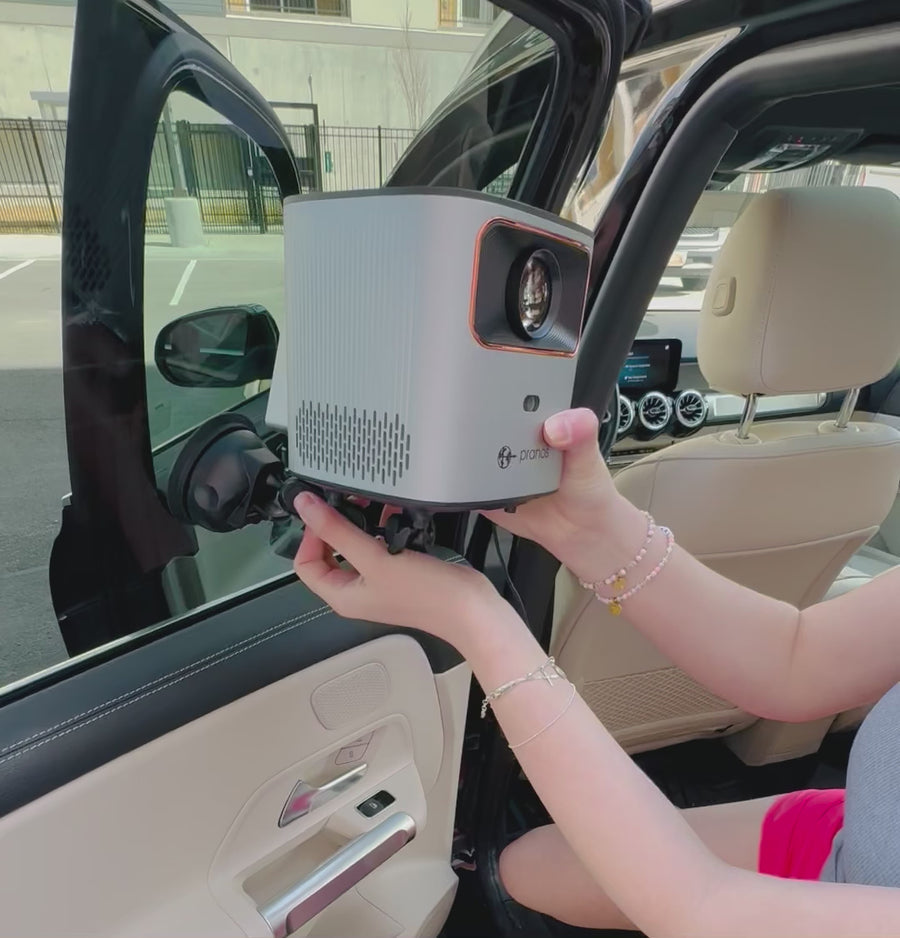
Mounting the HoloGlass unit

Real hardware fitted inside a vehicle

Real footage

Placing the custom-fit screen

Real screen fit on a vehicle window

Real footage

HD Visuals, custom-fit to your window

Each screen is made to match your car’s window pattern, so it slides right in.

Pranos AI

Say it. See it.

Pranos AI turns your car window into a smart digital window. Say or type the sign you want, and it usually designs it in about 12 to 30 seconds, depending on the level and your connection. Keep talking to change it.

The Pranos app’s Create menu: Make it with AI. Describe it, and AI designs it.
Tap +, then Make it with AI.
Example conversation
Pranos AI
Auto-play on HoloGlass

About 17 s · painted picture (the default)

Typedgrand opening of my coffee shop Sunrise Coffee Co, first cup free

The sign Pranos AI designed: GRAND OPENING, Sunrise Coffee Co, First cup free, in cream serif letters over a sunrise and a steaming cup of coffee

Here’s your grand-opening sign for Sunrise Coffee Co.

By voiceAdd my Instagram QR code.

The same coffee shop sign, with a QR code added in the bottom right corner

Done. Your Instagram code is in the corner.

The first request and its sign are real Pranos AI output. The QR edit was made for this page, and its code opens pranos.ai.
A sign Pranos AI designed on Premium: MAX’S EXOTIC CAR RENTALS, BOOK YOUR CAR HERE, over a supercar by a modern mansion in the LA hills at golden hour, with a QR code in the bottom left corner, in the back windshield shape
Designed by Pranos AI on Premium. The QR code was made smaller in the app.
Example sign Background painted by Pranos AI. Your QR code opens your page.

Make yours in the Pranos app

  1. Tap the + button, then Make it with AI.

    The Pranos app’s Create menu: Make it with AI. Describe it, and AI designs it.
  2. Ask for your sign and your QR code. It links to the page you give it, like your Instagram, TikTok, website or menu.

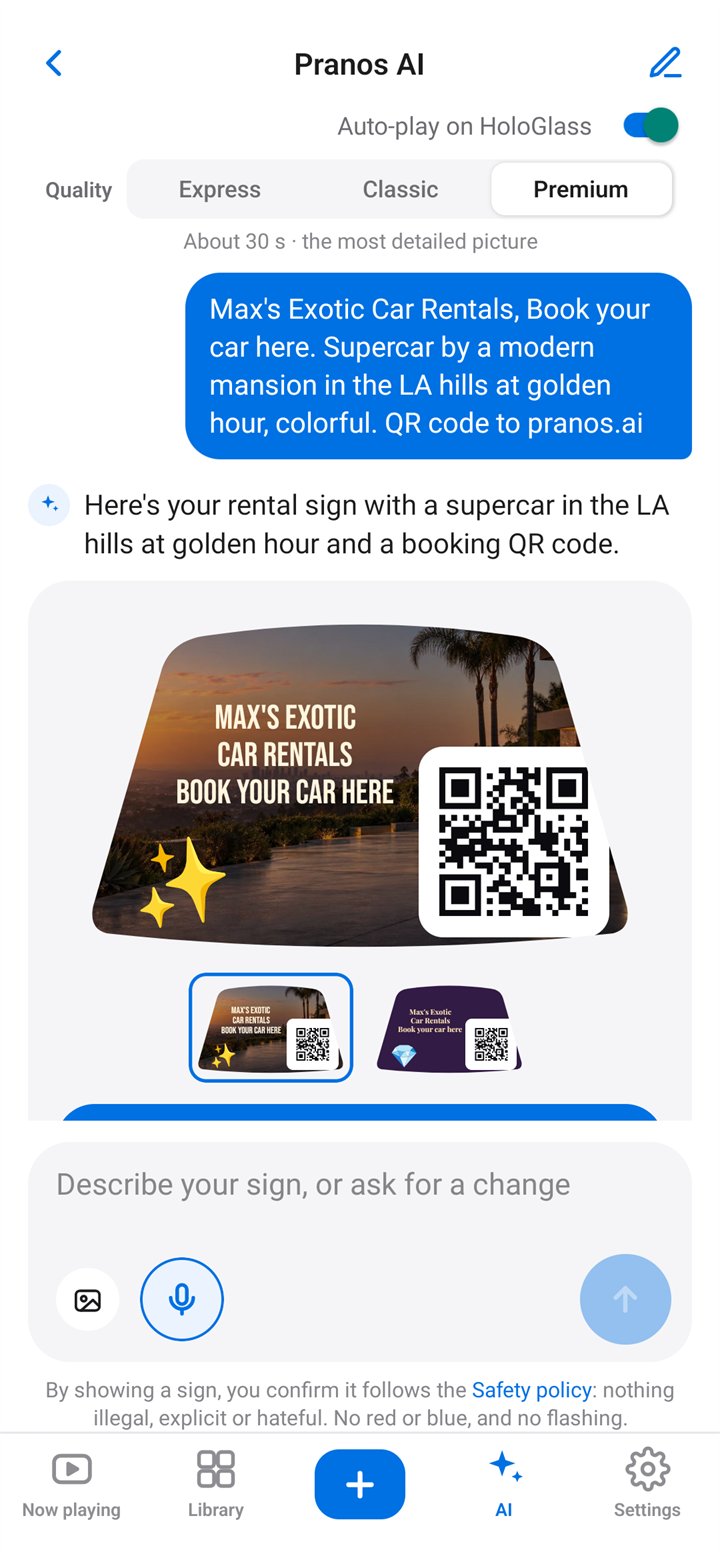
    The Pranos AI chat on Premium: the request for a Max’s Exotic Car Rentals sign, Book your car here, with a supercar by a modern mansion in the LA hills at golden hour and a QR code, and the sign Pranos AI painted, with two design choices
    A real Pranos AI chat on Premium. The business name is made up.
  3. Play it on your window while parked. Tap Play on HoloGlass.

Try saying

  • “Taco Night this Friday at 7”
  • “Open house this Sunday, 1–4 pm”
  • “Happy birthday Mia, we love you”
  • “Follow me @yourhandle”
  • “Make the letters bigger”
  • “Add my website QR code”

Choose how smart it thinks.

Classic is the default, about 17 seconds, with a painted picture.

All three levels are included with every kit.

Auto-play on HoloGlass. It’s off until you turn it on. Then each new sign plays on your window as soon as it’s ready, while the app is set to Parked. In Driving, the sign waits on its card: switch back to Parked, then tap Play on HoloGlass.

More signs Pranos AI designed from one sentence

HAPPY 50TH BIRTHDAY over “Dad, we love you” in cream serif letters, beside a gold-frosted cake with lit candles
happy 50th birthday dad, we love you
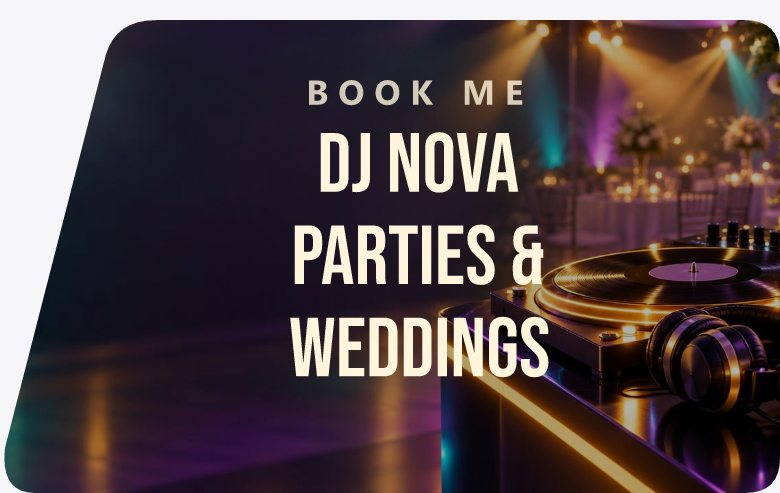
BOOK ME, DJ Nova, parties and weddings, over a lit dance floor and a turntable
DJ Nova, book me for your party or wedding
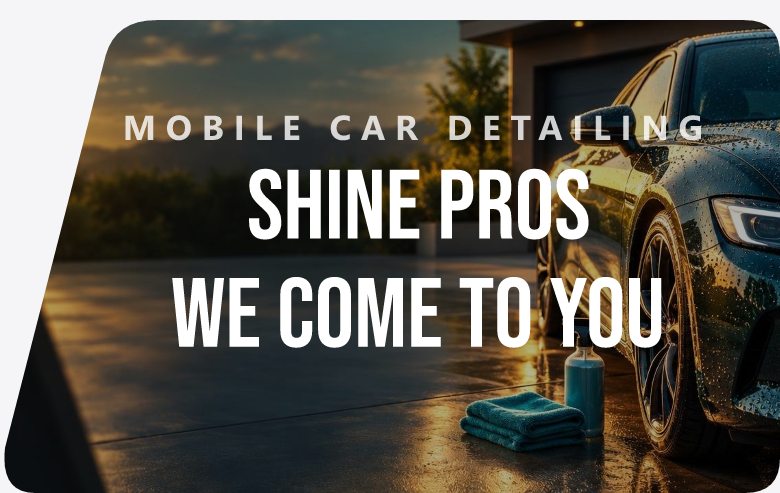
Example sign: MOBILE CAR DETAILING, Shine Pros, we come to you, over a freshly washed car, with a QR code added in the bottom left corner
Example sign mobile car detailing, Shine Pros, we come to you, with a QR code added
Example sign: BOUTIQUE, Maison Lune, in an elegant serif over gold silk and a moon, with a QR code added in the bottom left corner
Example sign minimal luxury sign for my boutique Maison Lune, with a QR code added

The business names are made up.

Sign builder

Or make it yourself.

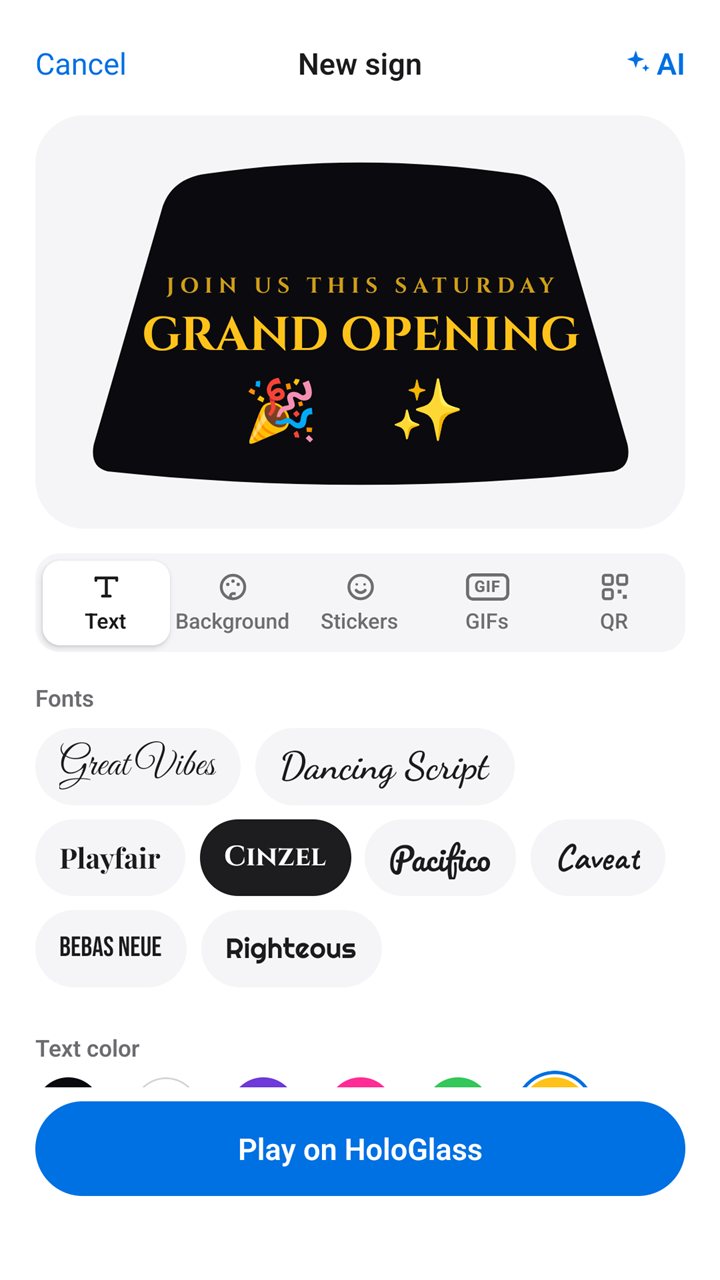
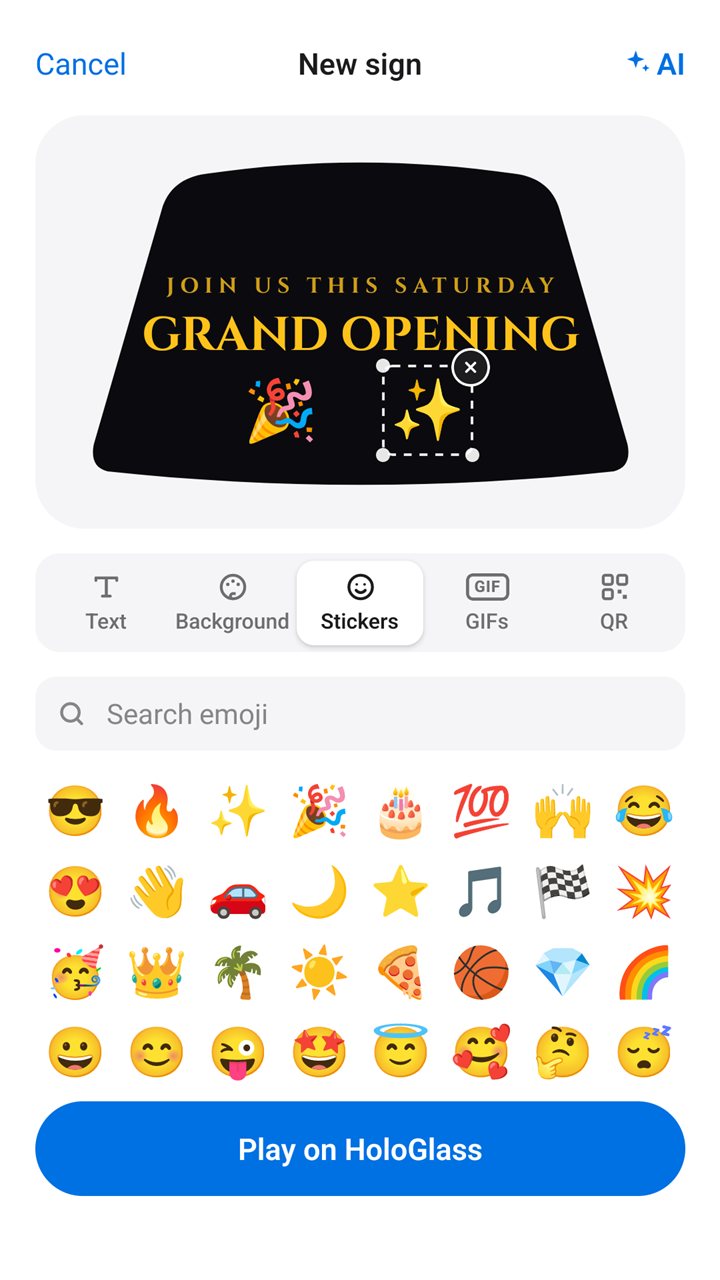
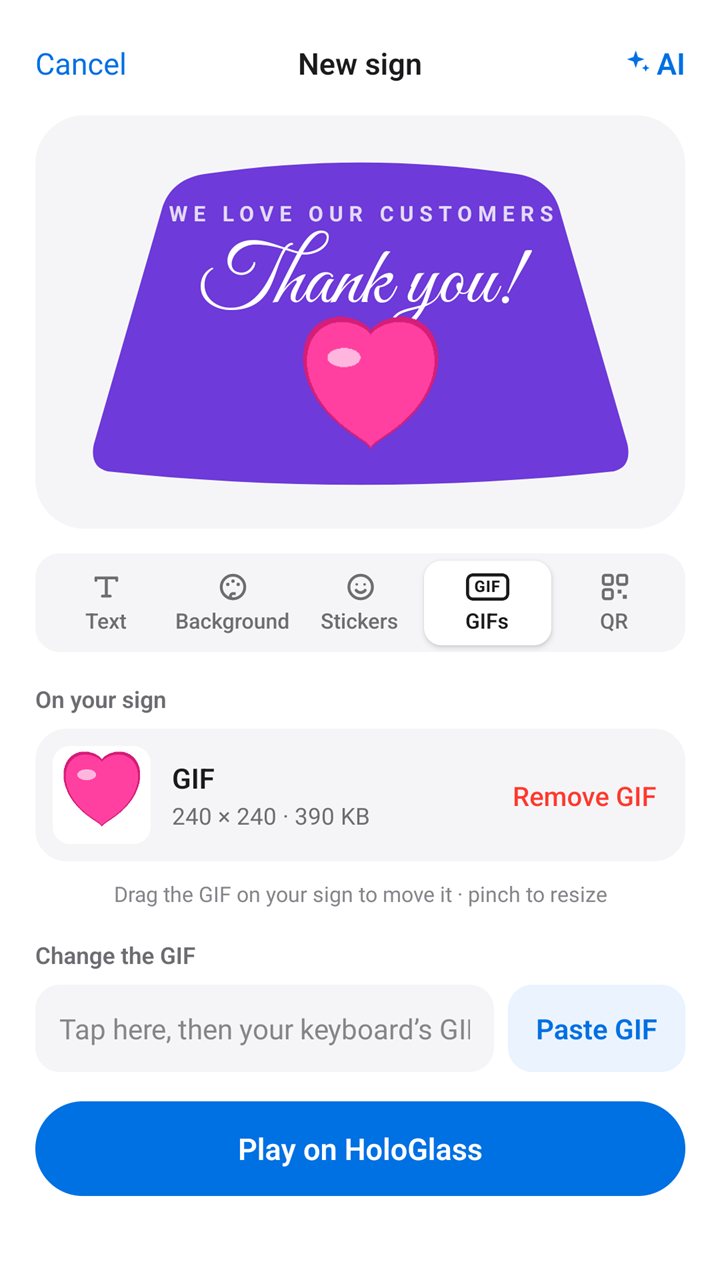
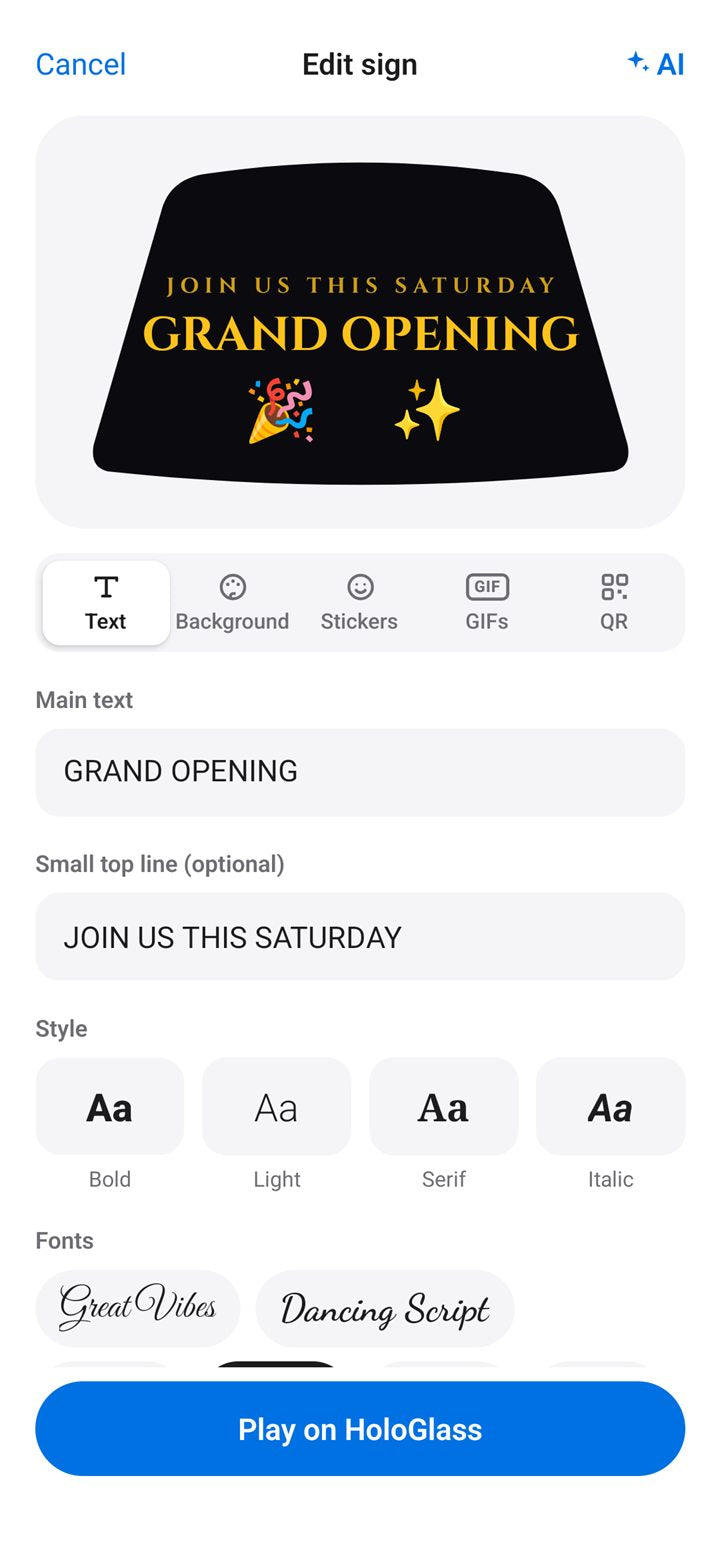
The Pranos app also has its own sign builder. Type your message, pick fonts and colors, and add stickers, a background and an animated GIF. Move and size anything with a finger.

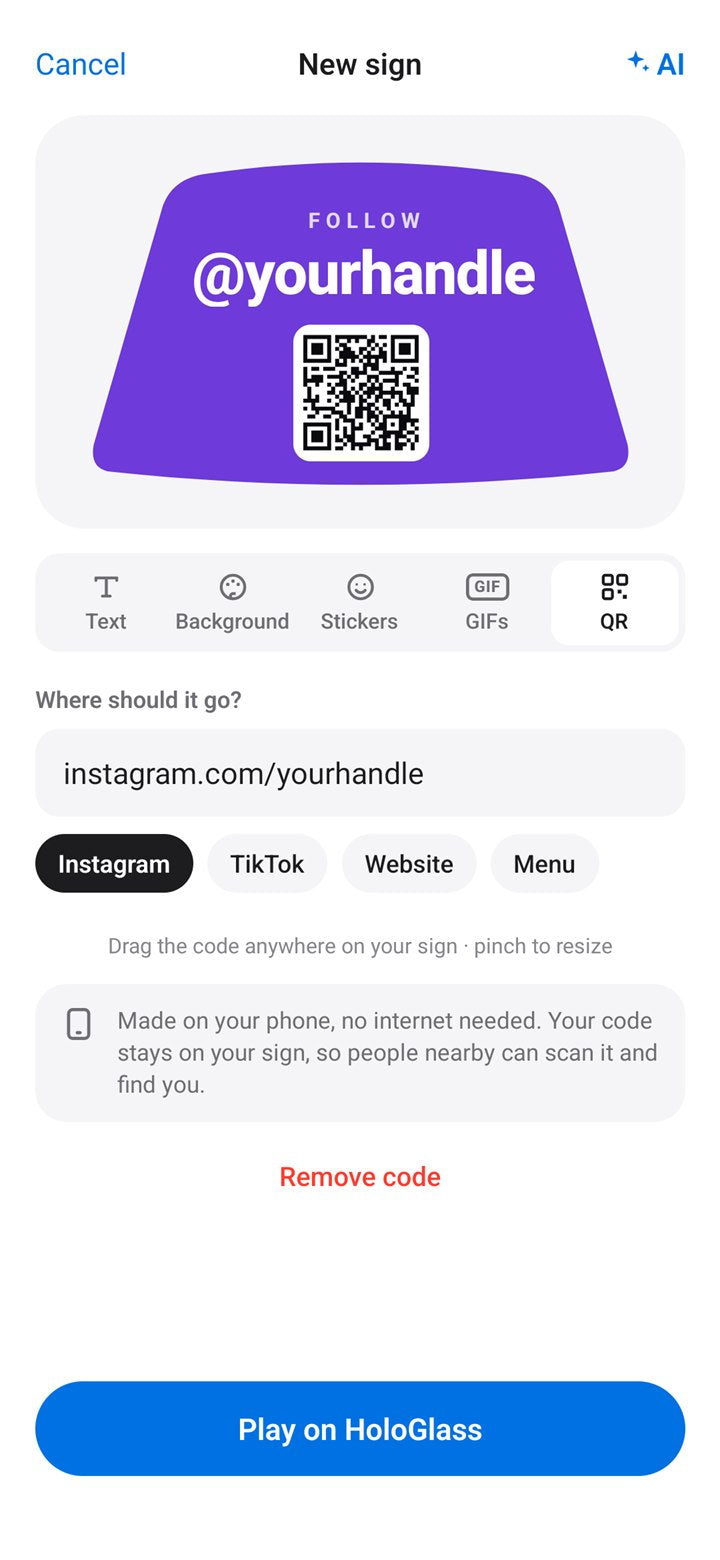
The app makes your QR code right on your phone, from the link you type. Tap Instagram, TikTok, Website or Menu to start it.

The Pranos app’s Text tab: a GRAND OPENING sign and fonts

Type your message, then pick a font and a color.

Pranos app

A direct line from your phone to your window.

Your phone talks straight to your HoloGlass, like a remote. There’s no account to sign into.

No internet needed.Nothing goes through the cloud to reach your window.
No router needed.Nothing to set up at home or at the venue.
No cell signal needed.Send and play photos and videos stored on your phone, in garages and far from any tower. Items kept only in iCloud need a connection to download first.

Good to know: some features, like designing with Pranos AI, need an internet connection. The app uses your phone’s mobile data for it, and your HoloGlass keeps playing. Without mobile data, the app briefly leaves your HoloGlass to reach the internet, then asks you to tap Join to reconnect. No signal? Use the sign builder. It works without internet.

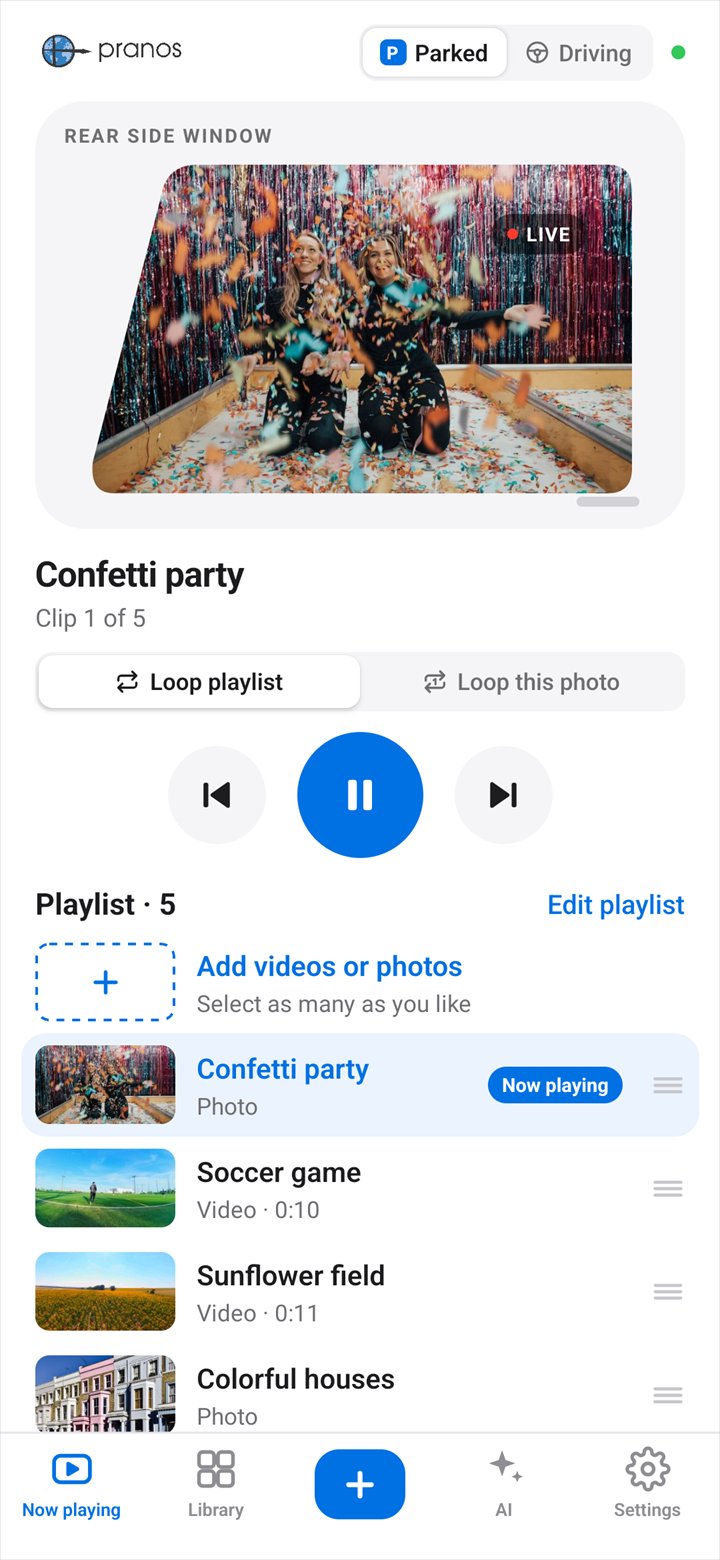
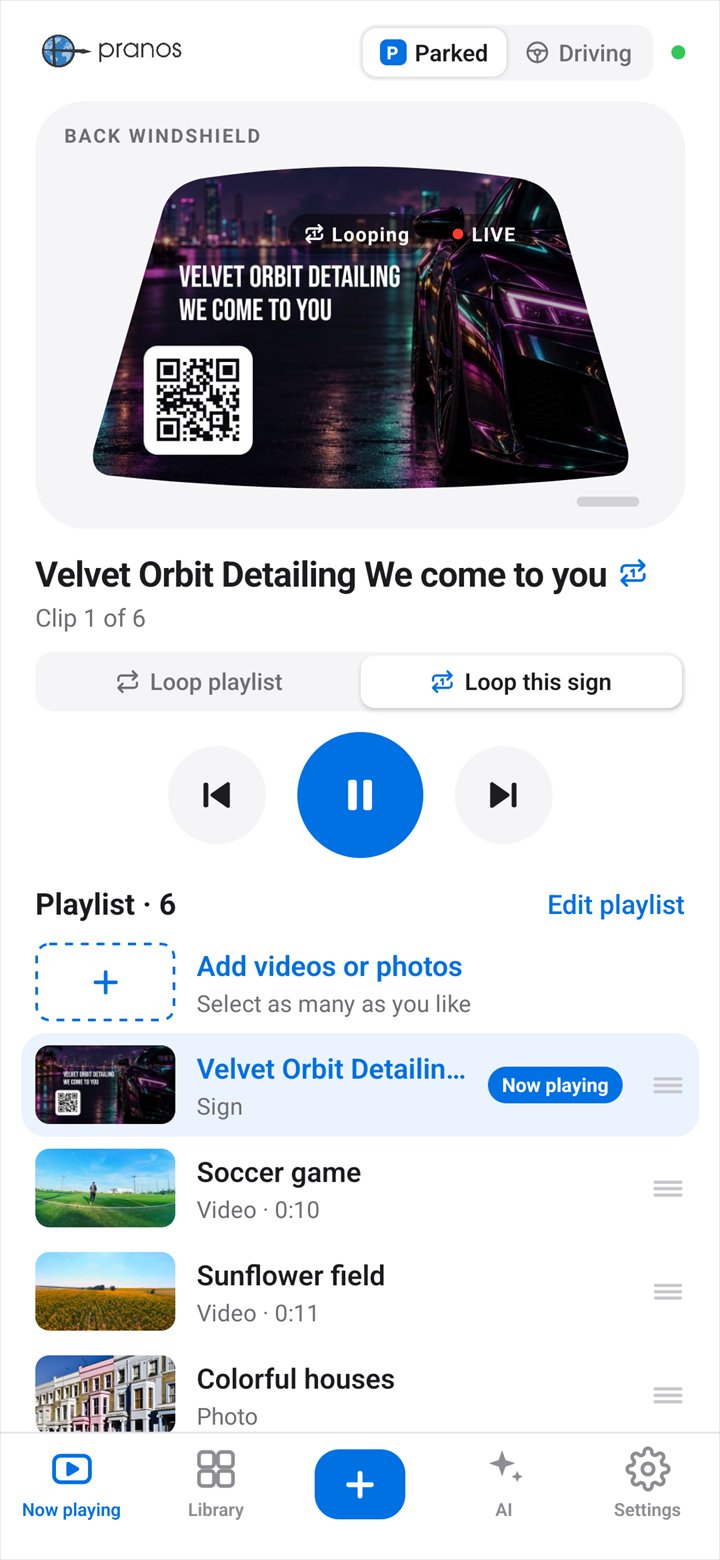
The Pranos app’s Now playing screen: Parked is selected, and the GRAND OPENING sign plays in the back windshield preview, with the play controls below
Your phonePranos app
HoloGlass Link
An SUV parked at night with HoloGlass lighting its back windshield and a rear side window
Your HoloGlassPlays it on the window

No internet needed to send and play what’s on your phone. Pranos AI needs a connection, and the app uses your phone’s mobile data for it.

Four ways to play content on your window.

  1. The Pranos app’s Send 3 to HoloGlass? sheet: a City lights video and 2 more, 84 MB, Add to playlist chosen, the Safety policy line and the Send to HoloGlass button

    Upload your videos and photos.

    Pick them from your camera roll and send them to your HoloGlass.

  2. The Pranos app’s sign builder: a GRAND OPENING sign in gold on black inside the back windshield shape, with the Text, Background, Stickers, GIFs and QR tabs, and Play on HoloGlass

    Build your own in the sign builder.

    Text, colors, stickers, a GIF and your own QR code.

  3. The Pranos AI chat on Premium after a follow-up, Move the QR code to the bottom left corner: the updated Max’s Exotic Car Rentals sign with the supercar and mansion in view, marked On your HoloGlass, with Edit and Try again
    A real Pranos AI chat: one follow-up moved the QR code. The business name is made up.

    Ask Pranos AI for a sign.

    Say or type what you want, and it designs it. Save your Instagram, TikTok or website once. When you ask for a QR code, it points there.

  4. LIVE
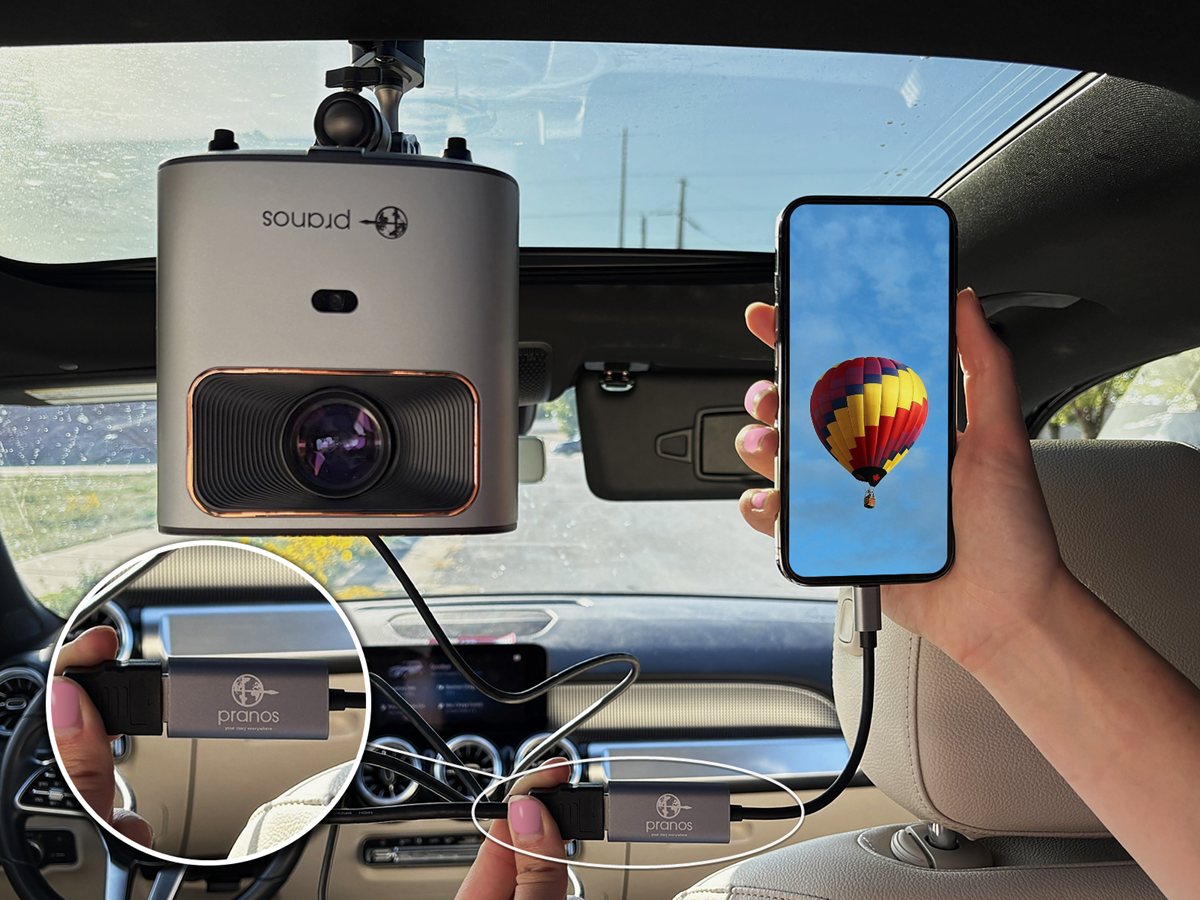
    The PRANOS USB-C to HDMI phone adapter, with the PRANOS logo

    In every kit: the PRANOS USB-C to HDMI adapter and an HDMI cable.

    Or screen mirror your phone directly with our HDMI adapter.

    No app needed. Plug your phone into the HoloGlass unit with the included cable and adapter, and what’s on your phone shows on your window, livestreams included. Your phone needs USB-C video output.

All four come with every kit. Play video only while parked.

Made for your car

Type your car. See if it fits.

Enter your car’s year, make and model, and the fit tool tells you right away which windows fit. Rear Side Door fits most sedans, SUVs, crossovers and pickups with rear side windows.

From above

How your content gets to the window.

Pick your window. The HoloGlass unit lights the screen from inside the car, and people outside see the picture.

STREET SIDEWALK
Your screen HoloGlass unit, on the opposite window

Rear Side Door

The HoloGlass unit sits on the opposite rear window, on its suction-cup mount. Its light crosses the back seat to your screen. People on the sidewalk see the picture.

The HoloGlass unit on its suction-cup mount, being fitted to a rear side window from inside the car
The suction-cup mount, on the opposite rear window

Back seat empty while it runs. Someone sitting there could block the picture and look into the light.

In every kit

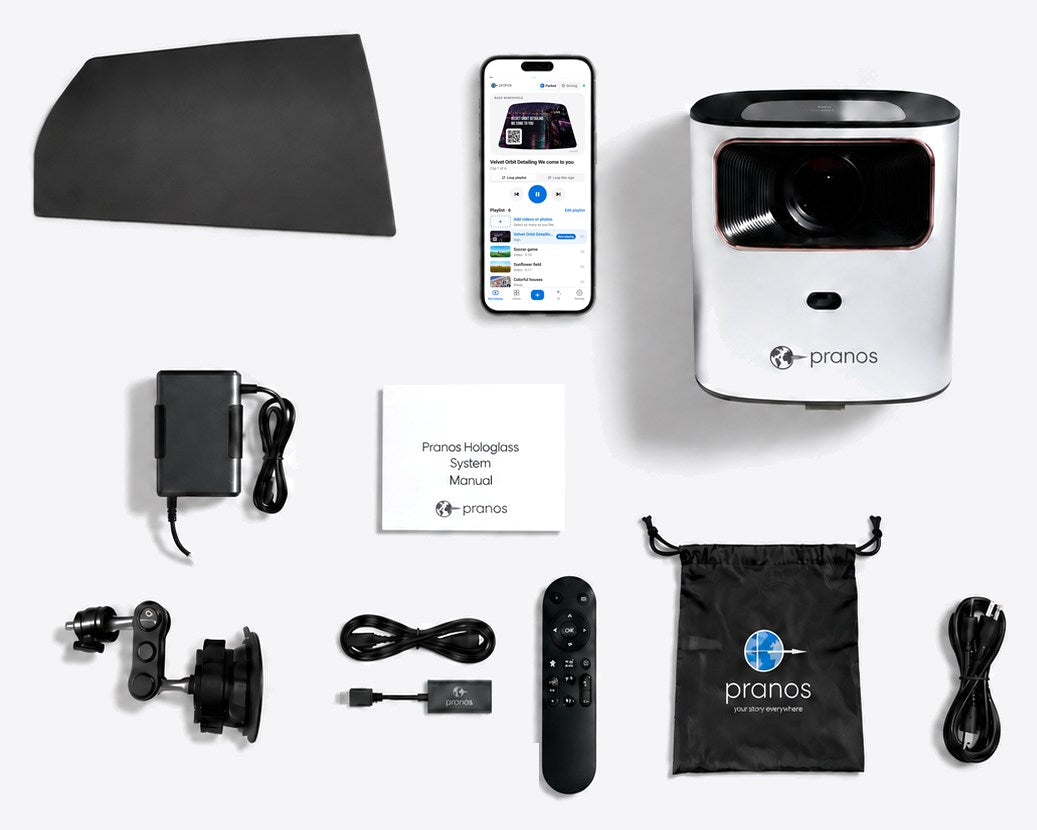
Everything included.

  • The HoloGlass unit, with 40 GB of storage (each file under 4 GB)
  • A screen made for your car’s window
  • Suction-cup mount
  • Power inverter for your 12-volt socket
  • Remote
  • HDMI cable and USB-C phone adapter
  • Setup guide and storage bag
  • The Pranos app
  • Pranos AI, with Express, Classic and Premium
  • The sign builder, with QR codes
  • Plays sound on any Bluetooth speaker you own

No monthly fee. Pranos AI includes a free monthly allowance.

Parked and Driving

Built to be seen. Use it responsibly.

Play video only while parked. Before you drive, switch the Pranos app to Driving.

The Pranos app’s Now playing screen, set to Parked: the sign that’s playing, in the window’s shape, and the play controls Now playing set to Driving: the play controls are dimmed, and the app says what’s on your HoloGlass stays put
Pranos appExample screen
The same sign as it plays on your HoloGlass, inside a back windshield outline Stays put
Your HoloGlass

Parked: videos, photos, GIFs and signs play. Driving: a playing video pauses on the frame it’s on, and a photo or sign stays up.

Driving holds what’s on your HoloGlass.

Switch the Pranos app to Driving: a playing video pauses on the frame it’s on, and a photo or sign stays up. The app won’t play or upload anything new until you switch back to Parked.

You set the switch yourself, at the top of Now playing in the Pranos app. It never changes on its own, and it doesn’t sense motion. Stopped in traffic isn’t parked.

Switch to Driving while your phone is connected to your HoloGlass, so it can hold what’s showing. If more than one phone uses your HoloGlass, set each one to Driving.

“You can’t upload videos or photos while you drive.”

The Pranos app, if you try to upload in Driving

Pranos AI’s Auto-play is off until you turn it on. In Driving, a new sign waits on its card: switch back to Parked, then tap Play on HoloGlass.

Front Windshield: parked only.

Take the screen down before you drive.

Our tools and Pranos AI don’t create flashing effects.

Every GIF is checked on your phone before it can go on a sign. Your own videos aren’t checked, so don’t send anything that flashes.

Pranos AI declines police look-alikes.

It’s designed to keep police, emergency and traffic-control wording, like “Police,” “Pull over,” “911” or a “Stop” command, off your sign, and it leaves out emergency emoji.

Bright red and blue are left out of the sign builder and Pranos AI.

They can look like emergency lights. Your own photos, videos and GIFs aren’t changed.

Some places restrict any display while the car moves, even a still image. Check your local rules, and turn HoloGlass off where it isn’t allowed. You’re responsible for what your window shows.

Safety and local rules ›

GOOD TO KNOW

Questions, answered.

HoloGlass is a new type of product. Here are the answers customers usually need before ordering.

Questions or orders? Call or text (415) 754-8430.

Will my device work with HDMI or the app?

HDMI screen mirroring
The HDMI cable and USB-C–to–HDMI adapter are included. Connect a compatible phone, tablet, or laptop with USB-C video output. A USB-C charging port alone does not guarantee compatibility.

  • iPhone with Lightning: iPhone 5–14 and iPhone SE generations 1–3 require a compatible Lightning Digital AV adapter instead of the USB-C adapter.
  • iPhone with USB-C: iPhone 15, 16 and 17 models support wired display output, except iPhone 16e and 17e.
  • Android: Your exact phone model must support USB-C video output (DisplayPort Alt Mode). A USB-C charging port alone does not guarantee compatibility.
  • Tablets and laptops: The USB-C port you use must support video output, such as DisplayPort Alt Mode or Thunderbolt. Check your device’s specifications.

Not sure about your device? Contact us with its exact model before you use HDMI.

The Pranos app
Comes with every kit. It runs on iPhone with iOS 17 or later. Android is coming soon to Google Play. Your phone doesn’t need HDMI video output for the app.

Does it work during the day?

It looks best from dusk to night. Bright midday sun washes it out. As the light fades, the picture gets stronger.

Can I install it myself?

Yes. The kit is designed for customer installation and includes the mounting hardware and setup guide. First-time setup varies by vehicle. Later installations are faster. Run it with the back seat empty. For live setup help, call (415) 761-1328.

Can I use it while driving?

Play video only while parked. Stopped in traffic isn’t parked. Before you drive, with your phone connected to your HoloGlass, switch the Pranos app to Driving: a playing video pauses on the frame it’s on, a photo or sign stays up, and the app won’t play or upload anything new until you switch back to Parked. Driving is a switch you set on each phone, and it doesn’t sense motion. Driving covers what the Pranos app plays. It doesn’t control HDMI mirroring or the HoloGlass unit’s other inputs. Some places restrict any display while the car moves, even a still image, so check your local rules and turn HoloGlass off where it isn’t allowed. You’re responsible for how you use HoloGlass and what it shows. The Front Windshield is parked only. Take the screen down before you drive.

Is there a monthly fee?

No. The Pranos app and Pranos AI come with every kit. Pranos AI includes a free monthly allowance. If you use it up, you can keep making signs yourself in the sign builder until it resets.

When does it ship, and can I return it?

We make your screen to match your car’s window and ship it within 3 business days. You can return it within 15 days. There’s a $75 restocking fee, because every screen is custom-made. To start a return, email support@pranos.ai. Refund policy ›

YOUR STORY. OUTSIDE.

Your window has something to say.

The smart display for your car window, powered by Pranos AI. Pick your window and tell us your car, and we make the screen to fit.

Order HoloGlass